






- 2.1: Home
- 2.2: Gratuito o a Pagamento?
- 2.3: Server SMTP Dedicato
- La page courante est 2.5: Servizi API
- 2.6: Servizi VPN Illimitati
- 2.7: Servizi SMTP
- 2.8: Servizi Personalizzati
- 2.9: Infrastruttura SMTP Aziendale
- 2.10: Domini e servizi di hosting
- 2.11: Informazioni sul pagamento
- 2.12: Contatto
Servizi API
Send email from your own website, app or script with a simple HTTP request. Use it for single messages or high volumes, with HTML content and attachments.
You need an API subscription. Your two credentials, apiKey and authUser, are on your My Credits page.
Endpoints
All endpoints are on https://service.5ymail.com. Every response is JSON.
Send your first email
Replace the two credentials and the recipient, then run this in a terminal:
Request
curl -X POST https://service.5ymail.com/api \
  -H "Content-Type: application/json" \
  -d '{
    "apiKey": "YOUR_API_KEY",
    "authUser": "YOUR_5YMAIL_USERNAME",
    "toEmail": "recipient@example.com",
    "subject": "Hello from the 5yMail API",
    "content": "<p>It works.</p>"
  }'
Response
{
  "emailId": 123456,
  "message": "OK"
}
Keep the emailId: you can use it to check the email's status later.
Prefer to click rather than type? Import the 5yMail Postman collection. It has ready-made requests for sending and for checking an email's status. There are also video guides on YouTube.
Parameters for sending
All four ways of sending take the same parameters. Only the way you pass them differs: a JSON body, form data, or the URL.
| Parameter | Required | Description |
|---|---|---|
apiKey | Yes | Your API key, from My Credits. |
authUser | Yes | Your 5yMail username, also shown on My Credits. |
toEmail | Yes | The recipient. One address per request. |
subject | Yes | The subject line. |
content | Yes | The message body. HTML is supported. |
fromEmail | No | The sender address. If you leave it out, 5yMail's default sender address is used. |
fromName | No | The sender name. Defaults to "Sender". |
ccEmail | No | One CC address. |
bccEmail | No | One BCC address. |
replyEmail | No | Where replies go. If you leave it out, replies arrive in your 5yMail received messages. If you set it, replies go only to this address. |
replyName | No | The name shown for replyEmail. |
xMailer | No | The X-Mailer header of the email, for example Microsoft Outlook. In the JSON body of POST /api, name this field xMailler. |
serverLocation | No | Which mail servers send the email: asia, europe or usa. If you leave it out, one is chosen for you. |
lang | No | The language site your account was created on: en, fr, es, it, de, ru, or cn for Chinese. Defaults to en. If it doesn't match your account, the request fails with "Username invalid". |
dedicatedIp | No | Only for dedicated IP or dedicated SMTP server subscriptions. Send the exact value assigned to your account, in the form username-IP=domain, for example ianccpii-20.97.149.191=my.e9mail.com. |
Send an email (JSON)
Send the parameters as a JSON object with the header Content-Type: application/json. This is the best choice for HTML content of any length.
Request body
{
  "apiKey": "YOUR_API_KEY",
  "authUser": "YOUR_5YMAIL_USERNAME",
  "toEmail": "recipient@example.com",
  "fromEmail": "news@yourdomain.com",
  "fromName": "Your Company",
  "subject": "Your order has shipped",
  "content": "<p>Your order is on its way.</p>",
  "ccEmail": "cc@yourdomain.com",
  "bccEmail": "archive@yourdomain.com",
  "replyEmail": "support@yourdomain.com",
  "replyName": "Customer Support",
  "xMailler": "Microsoft Outlook",
  "serverLocation": "usa",
  "lang": "en"
}
Response
{
  "emailId": 123456,
  "message": "OK"
}
See this request in Postman
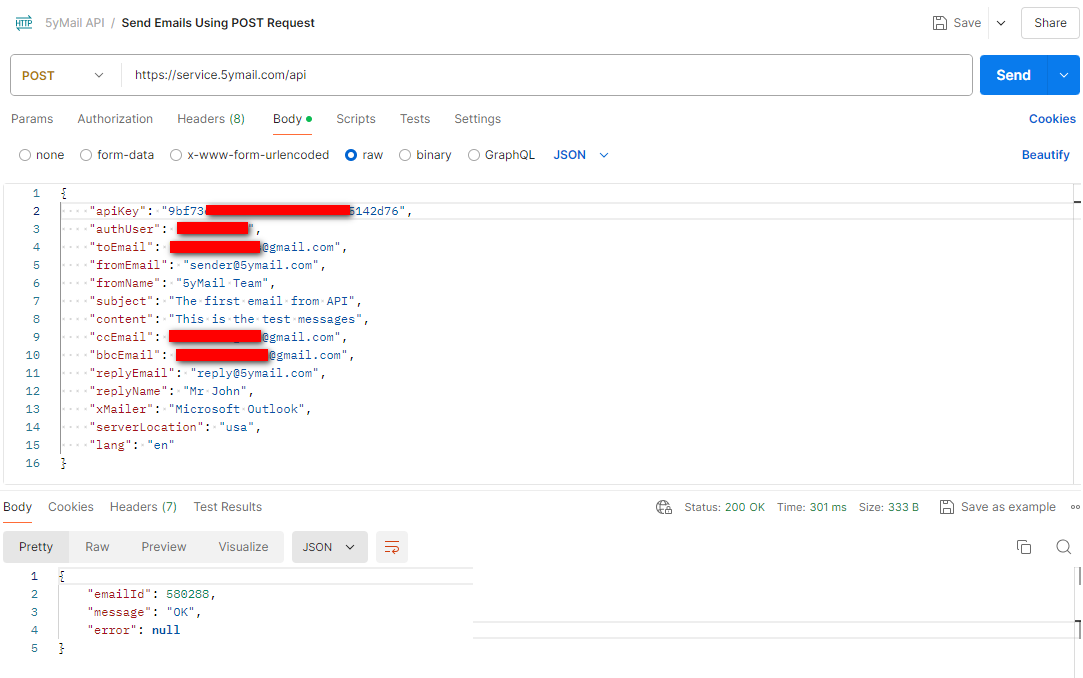
Send an email with one attachment
Send the parameters as form fields (multipart/form-data) and add the file in a field named attach. The file can be up to 20MB.
Request
curl https://service.5ymail.com/api-with-attachment \
  -F apiKey=YOUR_API_KEY \
  -F authUser=YOUR_5YMAIL_USERNAME \
  -F toEmail=recipient@example.com \
  -F subject="Your invoice" \
  -F content="Your invoice is attached." \
  -F attach=@invoice.pdf
The response is the same as for POST /api.
See this request in Postman
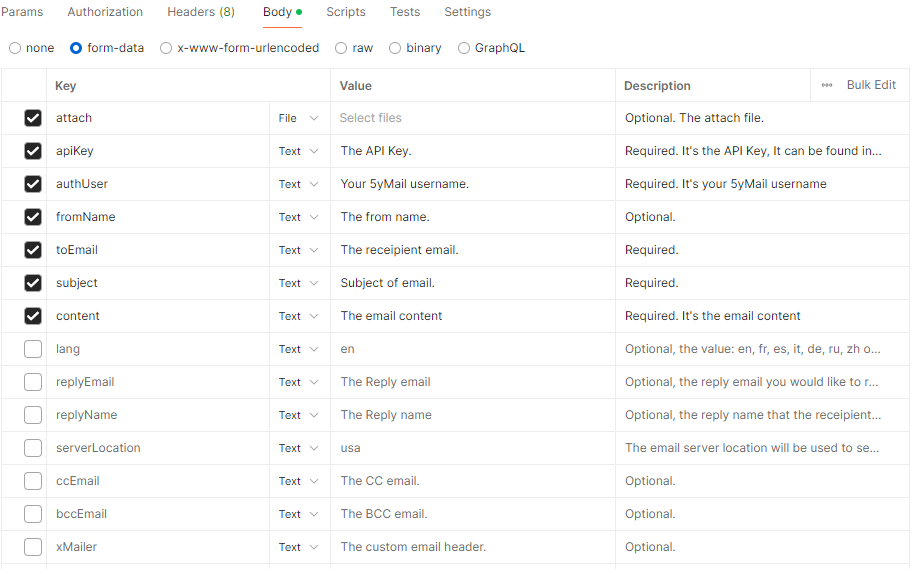
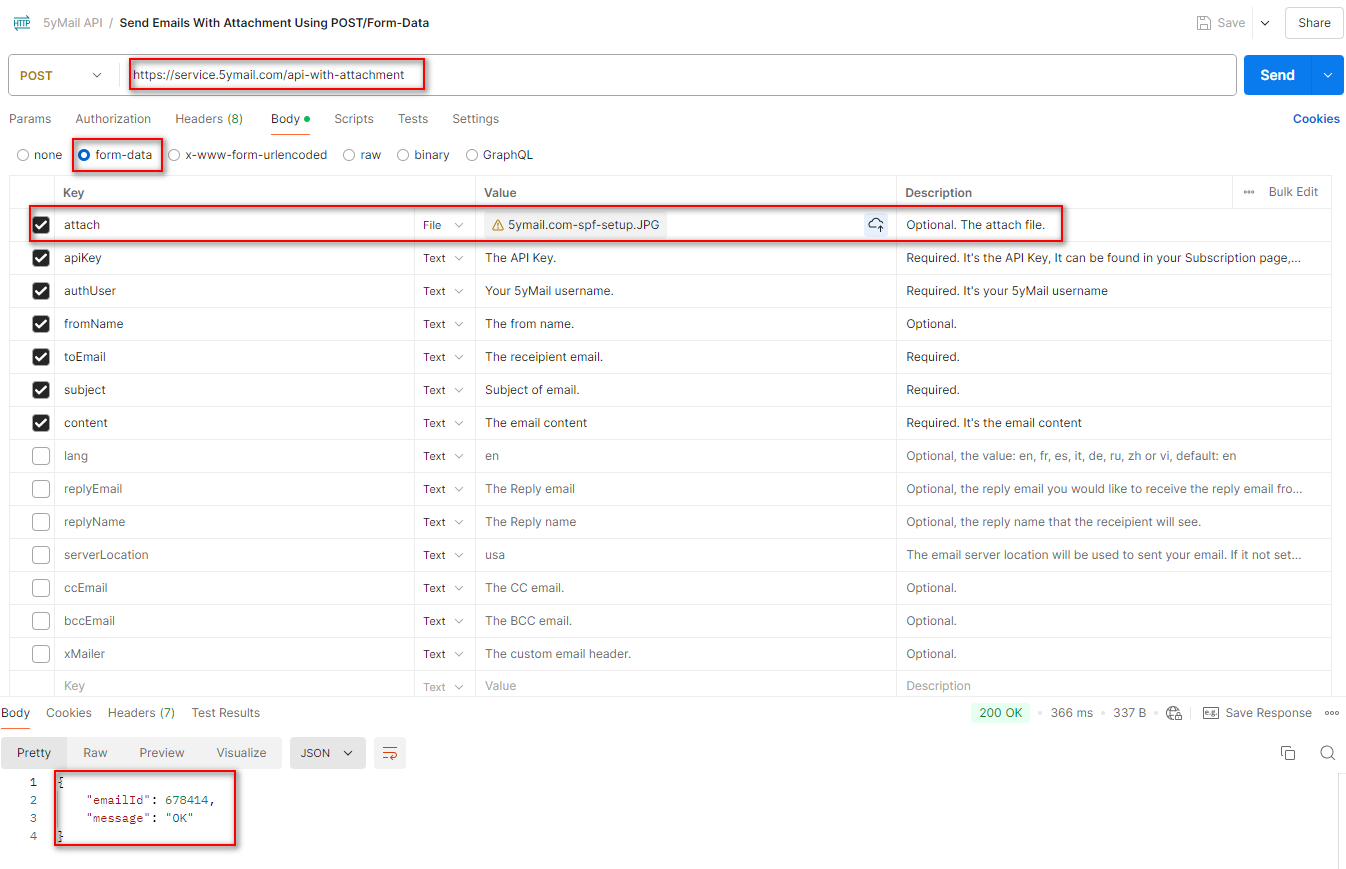
Send an email with up to 5 attachments
Works like the single-attachment endpoint, but takes up to 5 files. Add one attach field for each file. The names attach1 to attach5 and attach[] also work.
- Each file can be up to 20MB, and all files together up to 25MB.
- A request with more than 5 files is rejected, and no email is sent.
Request
curl https://service.5ymail.com/api-with-attachments \
  -F apiKey=YOUR_API_KEY \
  -F authUser=YOUR_5YMAIL_USERNAME \
  -F toEmail=recipient@example.com \
  -F subject="Monthly report" \
  -F content="The files are attached." \
  -F attach=@report.pdf \
  -F attach=@data.csv \
  -F attach=@photo.png
The response is the same as for POST /api. In the Postman collection, use the request "Send Emails With Multiple Attachments Using POST/Form-Data".
Send an email (URL parameters)
Put every parameter in the URL. This is handy for quick tests and simple tools. URL-encode each value, and use POST /api for long HTML content, because very long URLs can be cut off.
Request
https://service.5ymail.com/api?apiKey=YOUR_API_KEY&authUser=YOUR_5YMAIL_USERNAME&toEmail=recipient@example.com&subject=Hello&content=It%20works&lang=en
The response is the same as for POST /api.
See this request in Postman
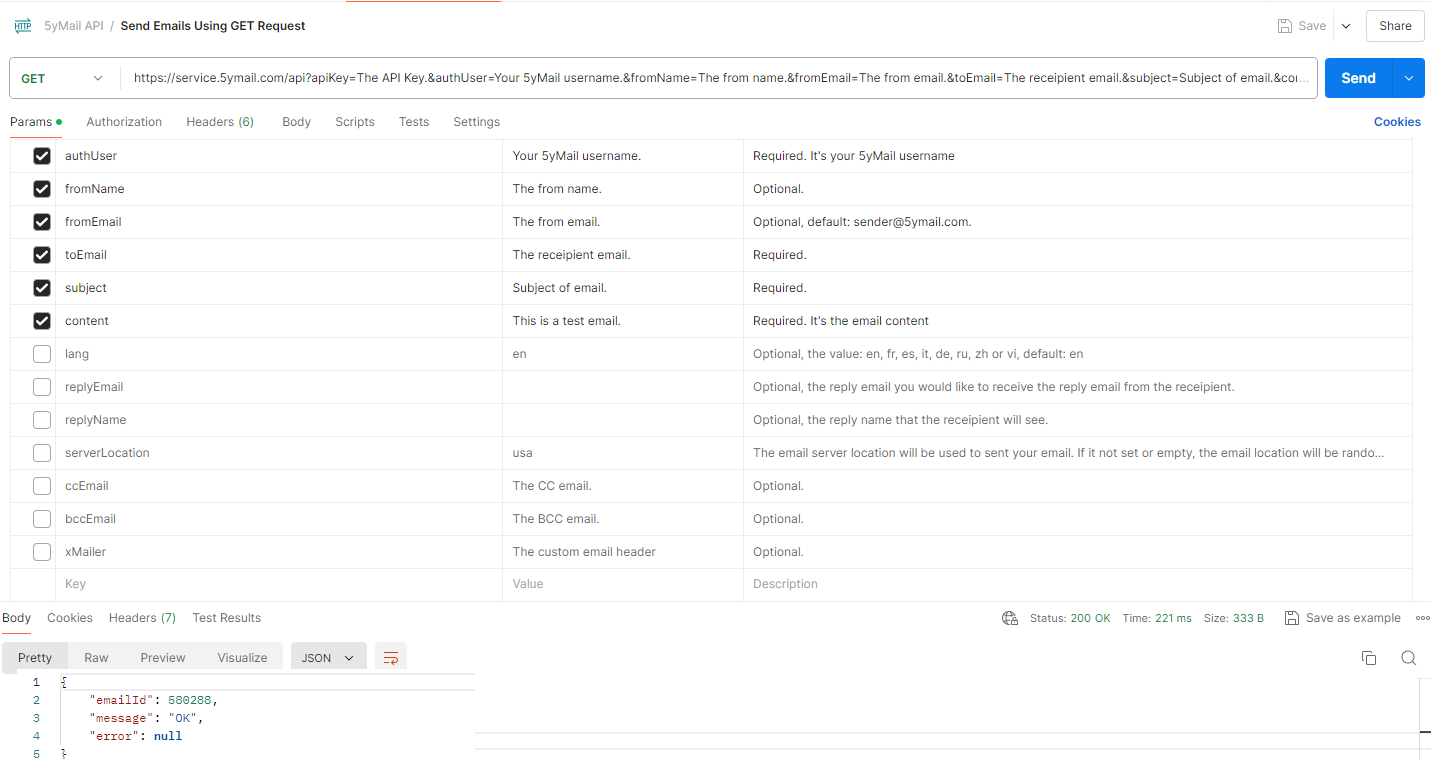
Check the status of an email
Use the emailId you got back when you sent the email. Pass apiKey, authUser and, if your account isn't on the English site, lang in the URL. You can only look up emails sent from your own account.
Request
https://service.5ymail.com/api/123456?apiKey=YOUR_API_KEY&authUser=YOUR_5YMAIL_USERNAME
Response
{
  "emailId": 123456,
  "fromEmail": "news@yourdomain.com",
  "fromName": "Your Company",
  "toEmail": "recipient@example.com",
  "replyEmail": "support@yourdomain.com",
  "replyName": "Customer Support",
  "subject": "Your order has shipped",
  "content": "<p>Your order is on its way.</p>",
  "ccEmail": "",
  "bccEmail": "",
  "serverLocation": "usa",
  "createdDateTime": "2026-09-25T23:56:05",
  "lang": "en",
  "deliveryNote": "2.0.0 (success), smtp;250 2.0.0 OK",
  "status": "Delivered",
  "xmailler": "Microsoft Outlook"
}
status is Delivered once the recipient's mail server has accepted the email. Until then it is Sent. deliveryNote holds the latest message from the mail servers, which explains a delay or a rejection.
See this request in Postman
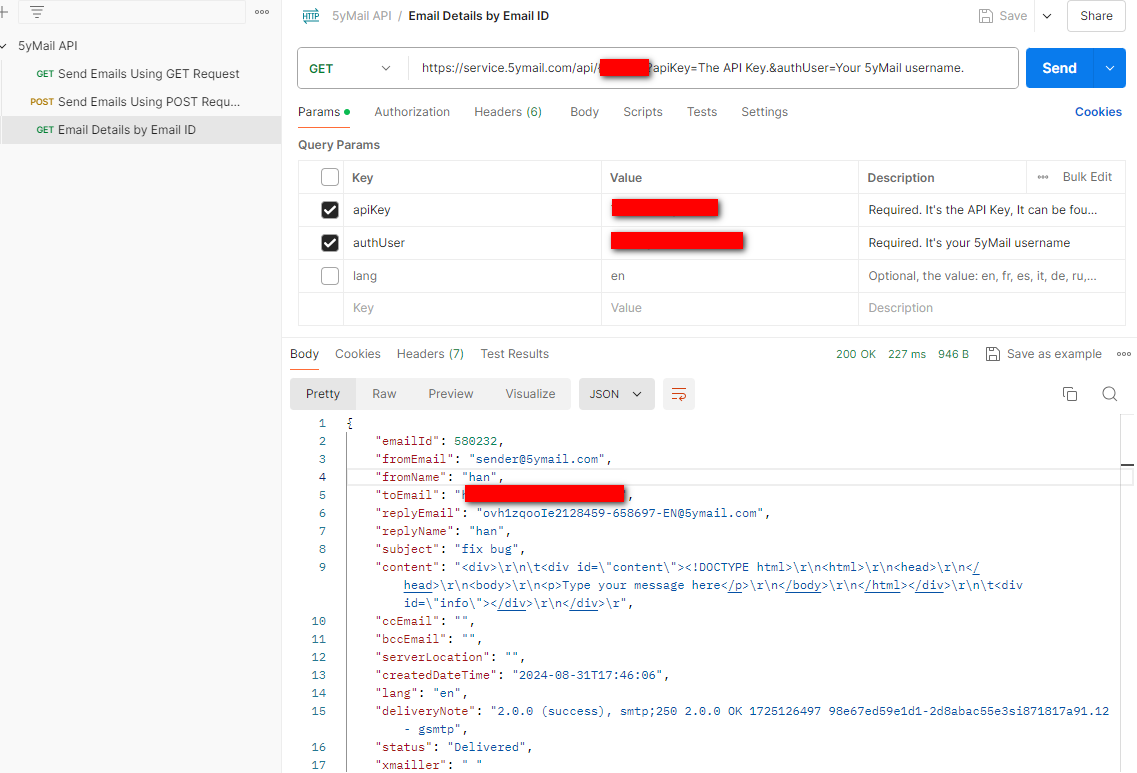
Check that an address can receive email
Checks that the address is well formed and that its domain has working mail servers. It doesn't confirm that the mailbox itself exists. Pass email, apiKey, authUser and optionally lang.
Request
https://service.5ymail.com/api/validate-email?email=david@gmail.com&apiKey=YOUR_API_KEY&authUser=YOUR_5YMAIL_USERNAME
Response when the address can receive email
{
  "message": "OK"
}
Otherwise message is ERROR and error gives the reason, for example "Email NOT deliverable. Invalid email format."
Errors
When a request fails, message is ERROR and error says what went wrong. Check message rather than the HTTP status code: most errors return status 500, a file that is too large returns 413.
Example
{
  "message": "ERROR",
  "error": "toEmail invalid."
}| Error | What to do |
|---|---|
| Required request parameter 'apiKey' … is not present | A required parameter is missing from the form or URL. The quoted name tells you which one. |
| apiKey is required. authUser is required. subject is required. content is required. | A required field is missing or empty. |
| toEmail invalid. fromEmail invalid. ccEmail invalid bccEmail invalid replyEmail invalid | That address isn't a valid email address. Each field takes one address. |
| Username invalid or language associated to the account invalid. | Check authUser, and set lang to the site your account was created on. |
| ApiKey invalid | Copy the key again from My Credits. |
| User not yet activated. | Activate your 5yMail account first. |
| Your Normal Subscription expired. | Renew your subscription. |
| Your API Subscription not yet activated. Your API Subscription expired. | Buy or renew an API subscription. |
| Account reached to limit number of emails per day. … | You've sent your daily allowance. Wait until tomorrow or upgrade your subscription. |
| The From Email not allowed. … | Use a different fromEmail. |
| dedicatedIp invalid. … dedicatedIp is not authorized for this user. | Send the exact dedicatedIp value assigned to your account, or leave the field out. |
| Attachment too large. … | Send smaller files: up to 20MB each and 25MB in total. |
| Too many attachments: 6. The maximum is 5 files per email. | Send at most 5 files per email. |
| Email 123456: Access Denied. Email 123456: Not found. | The emailId belongs to another account or doesn't exist. |
Need help?
If something doesn't work as described here, contact us with the emailId or the full error message, and we'll look into it.
The 5yMail team
